
Release Notes
Everything you need to know about your Cabman MDT updates. Take a look below!
.png)
Release software MS27.1 🆕
MobilePay payment flow
It is now possible to allow customers to pay using MobilePay.
Please note: This requires both a MobilePay business account and additional configuration on the Cabman MDT.
The driver selects MobilePay as the desired payment method.
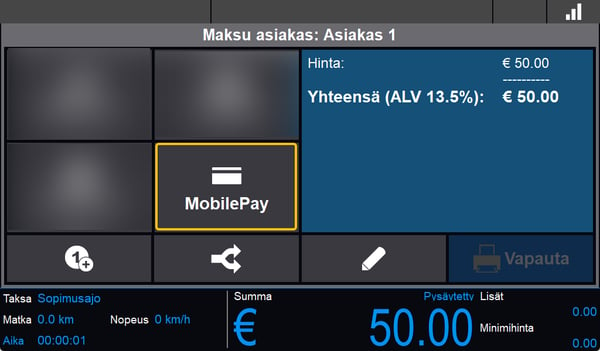
A QR code is shown. The customer can scan the QR code and will be directed directly to their (personal) MobilePay app.
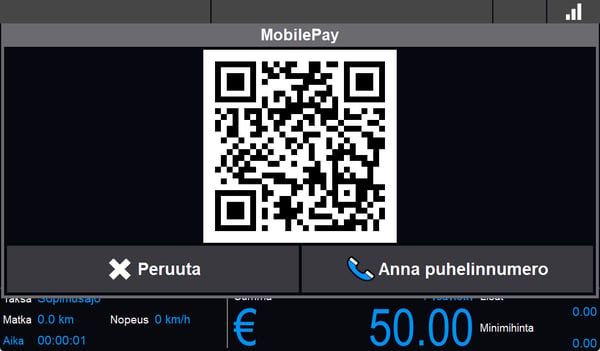
It is also possible to manually enter a customer's phone number that is linked to a MobilePay account.
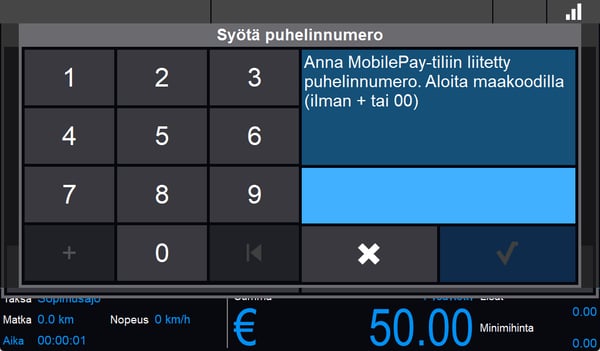
Once the customer has completed the payment, the trip will be automatically released.
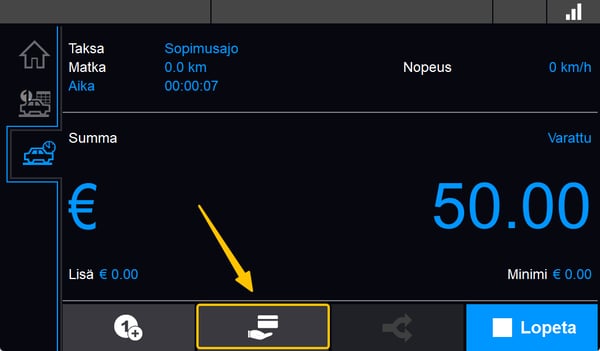
Button to check a payment card's balance
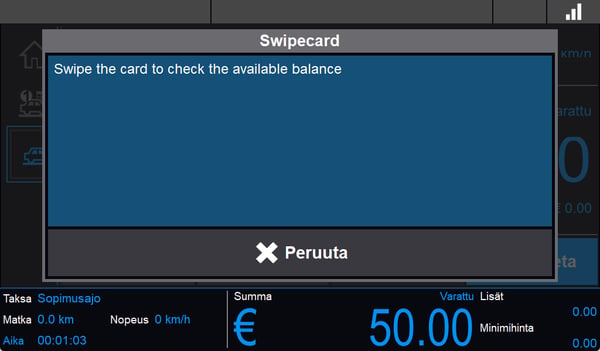
A button has been added for checking the balance of a payment card (e.g. Taksikortti,MPK) before starting a trip.
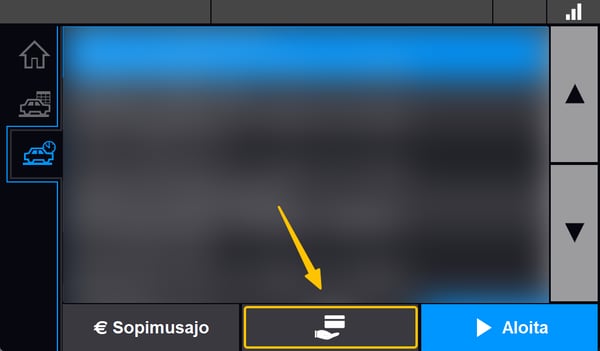
Or during a trip
Other
- Improved datacom stability
Release info:
- Date: 2026-08-12
- Tag: release/FIN-MS27.1
- Prebuild: FIN-MDT-MS27.1-1.8-25F864AB-2026-08-12-CRC-EA881DF6
- CRC: EA881DF6
- Subversion: 25F864AB
Release software MS 26.3
Changes
-
“No confirmation trip” pop-up resolved
Release info:
- Date: 19-05-2026
- Tag: release/FIN-MS26.3
- Prebuild: FIN-MDT-MS26.3-1.6-25A35497-2026-05-19-CRC-486FC07F.develop
- CRC: 486FC07F
- Subversion: 25A35497
Release software MS 26.2
Changes
-
Surcharges are being correctly added again.
Release info:
- Date: 21-04-2026
- Tag: release/FIN-MS26.2
- Prebuild: FIN-MDT-MS26.2-1.6-25875780-2026-04-16-CRC-31737E3B.develop
- CRC: DABD7CD8
- Subversion: 629626752
Release software MS 26.1
Changes
-
Dispatch Kela trips with surcharges.
-
The expiry date of an expired swipecard is now shown on the MDT.
Release info:
- Date: 25-03-2026
- Tag: release/FIN-MS26.1
- Prebuild: FIN-MDT-MS26.1-1.6-256C62D9-2026-03-25-CRC-E88CC3E.develop
- CRC: E88CC3E
- Subversion: 627860185
Release software MS 26
- Possible to sent combined trips for Kela from dispatch software.
- Added the RRN (Retrieval Reference Number) of a payment in in the stop messages for matching trips on the Cabman MDT and card transactions.
- Manual entry option for swipecard validation.
- The connection has been optimized. This may cause the Cabman MDT application to reboot outside of active shifts.
Release info:
- Date: 04-02-2026
- Tag: release/FIN-MS26
- Prebuild: FIN-MDT-MS26-1.5-253B71DC-2026-02-05-CRC-DABD7CD8.develop
- CRC: DABD7CD8
- Subversion: 253B71DC
Release software MS 25
- Stability improvements.
Release info:
- Date: 30-09-2025
- Tag: release/release_1.4_20250930
- Prebuild: FIN-MDT-MS25-1.4-24BC67B8-2025-09-30-CRC-9F86DB94.develop
- CRC: EA881DF6
- Subversion: 637035691
Release software MS 24.6
- New firmware can be used after an OS update.
Release info:
- Date: 05-08-2025
- Tag: release/release_1.4_20250805
- Prebuild: FIN-MDT-MS24.6-1.4-2484630B-2025-08-05-CRC-F28FF77A.develop
- CRC: F28FF77A
- Subversion: 2484630B
Release software MS 24.4
- New: Movit implementation.
- New: option to auto-resume a trip after adding a new Kela order.
- Improved: Mypos retry counter adjustable.
- Changes: Logos on printed receipts are only printed with the Cabman printer, not with MobilePro printers.
Release software MS 23.4- 28-03-2025
- Changed datacom retry settings to retry quicker and more often. This helps find a broken connection faster.
Release software MS23.3- 20-03-2025
- Fixed: External POS during split payment is now also under the pencil
- Fixed: so that fixed price trip now shows total instead of fare
- Fixed: The taximeter shows extra amount when in the payment dialog of a childtrip
Release software MS23.2- 25-02-2025
- Always show total will now lower with a paid transaction in a non MID enviroment.
Release software MS23.1- 25-02-2025
- Fixed: Payment method ‘External POS payment’ now back behind the pencil icon.
Release software MS23- 27-01-2025
- Fixed: Surcharges were not applied correctly during Kela-trips.
- Fixed: The tariff structure was sometimes missing from receipts when an initial fare was set. It is now always printed.
- New: Multiple connected POS devices can now be configured.
- Improved: Fixed price now includes a default VAT rate.
- Improved: Data communication stability.
Release software MS22 - 23-09-2024
Features:
- Integration for Western-card (in 'dispatch' areas).
- A Finnish keyboard layout.
- The ability to add surcharges during the trip (config change needed).
Improvements:
- Not-paid now has a confirmation dialog and removes registered tip from the trip.
- The ability to print a more displayable swipe card name to report.
- Options to delete navigation files (in workshop mode).
Bug fixes:
- Fixed the expiration date check for workshop cards.
Release software MS21.2 - 09-08-2024
- Fixed issue with cardinfo missing on receipt.
Release software MS21.1 - 23-07-2024
Bugfixes:
- Better protection against the driver starting duplicate myPOS transactions.
Release software MS21 - 03-06-2024
Improvements:
- NETS POS integration.
- Autocab support.
- Check expiredate of swipecards.
Bugfixes:
- Crash in payment solved.
Release software MS20.5 - 17-04-2024
Improvements:
- Changed the communication method of the A7682 modem.
Bugfixes:
- Always set APN settings when using the default Vodafone Cabman
Release software MS20.4 - 18-03-2024
Improvements:
- A new hearbeat system (PNG-message) has been added to test the connection every x seconds so that the connection recovers faster when dropped.
Release software MS20.3 - 23-02-2024
Improvements:
- Linux kernel thread logging
Release software MS20.2 - 12-02-2024
Improvements:
- Datacom thread logging.
- Autocab silent TRP message improved.
Release software MS20.1 - 31-01-2024
Features:
- Sent SYS message after LGN containing configuration information (for future OTA improvements)
- Setting to hide the gps-icon
Bugfixes:
- Fixed bug in socket abstraction layer
Improvements:
- Over the air update will now wait until shift report is printed
- Improved diagnostic logging
Release software MS20 - 04-01-2024
Features:
- Add swipecard number to receipt (TK/Western/MPK).
- Added alternative card payment under the Remarks popup (must first be enabled in config).
Bugfixes:
- Fixed bug where tariffinfo would be left empty.
Improvements:
- Added logging to detect an overvoltage.
- Added logging in various places to help diagnose modem disconnects.
- From this version there will be a notification as soon as a software or configuration update is ready.
Release software MS19.2 - 20-11-2023
- Extra modem logging.
Release software MS19.1 - 20-09-2023
- Bum trips not included in VAT-specification in shift report.
Release software MS19 - 05-09-2023
Features:
- Added toll flag to surcharge.
- Multiple VAT payment totals for shiftreport.
- Keep pop ups open whilst driving for printing receipt.
- Added product selection for MPK card, and allow skip own part.
- Changed the default tip method to enter 'Total Amount' instead of 'Tip Amount'.
- Add invoice type to receipt.
Bug fixes:
- Driver photo scaling.
- Card number not on receipt when transaction is canceled and changed to a different paymenttype.
Release software MS18.3 - 18-08-2023
Bugs fixes:
- Fixed swipecard crash during trip.
- Fixed application shutdown crash when using a verifone terminal.
Release software MS18.2 - 19-07-2023
Bug fixes:
- Fixed batch settle waiting problem for Verifone terminal (MDT will no longer wait if a new user logs in)
Release software MS18.1 - 13-06-2023
Features:
- Trip receipt now shows ‘vehicle id’ instead of internal communication number
- Shift report changes:
- Total payments (Maksu yht) now doesn’t include tips and not paid.
- Total fare (Hinta yht): minimum fare surcharge is now included in the total fare.
- Total extra (Lisät yht): minimum fare surcharge is no longer included in this total.
- “No show” button in payment screen to release trip without clearing trips in the MTI-driver app.
- Add surcharges with fixed price trips.
Bug fixes:
- Fixed problem not sending receipt to backend.